

You picked up your phone this morning, and something was off. A thin green line running down the display. A dark patch is spreading in the corner. Or maybe a cluster of black spots that wasn’t there yesterday. It’s unsettling, especially when your phone seemed perfectly fine the night before.
You’re not alone. Screen anomalies like vertical coloured lines, dead pixels, and spreading black blotches are among the most common issues reported by smartphone users across Australia. The good news? Understanding what’s behind these symptoms can help you figure out whether it’s a quick fix or something that needs professional attention.
Let’s break it all down.
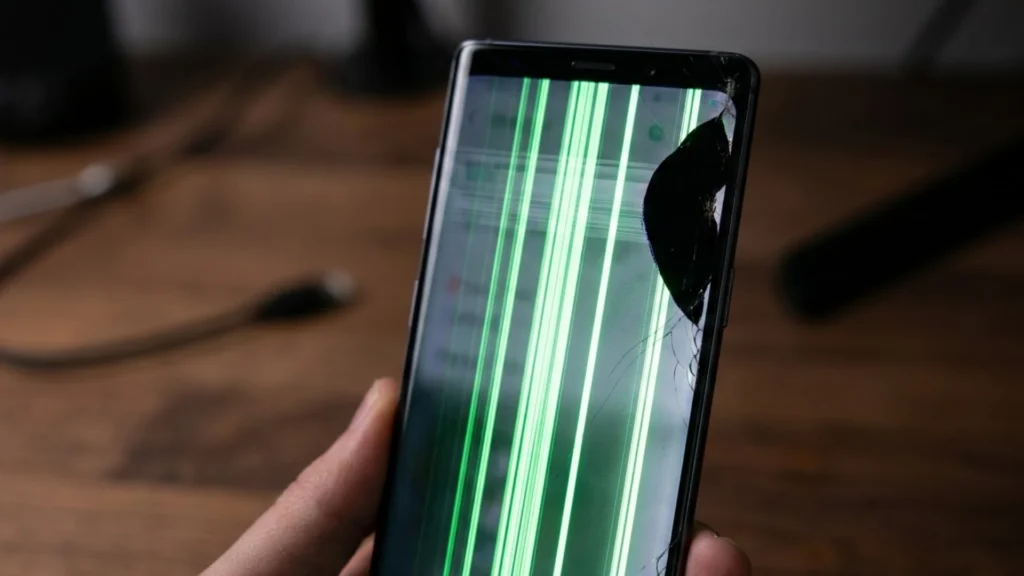
Why Does a Phone Screen Suddenly Show Green Lines or Black Spots?
Before jumping to conclusions, it helps to understand how a modern phone screen actually works. Most smartphones use either an OLED (Organic Light-Emitting Diode) or LCD (Liquid Crystal Display) panel. These screens are made up of millions of tiny pixels, each controlled by delicate circuitry underneath. When something disrupts that circuitry physically, electronically, or through software, visible damage appears on the display.
Green lines, black spots, pink lines, flickering, and discolouration are all symptoms of underlying faults. The cause could be hardware, software, or even a combination of both. In many cases, diagnosing the exact issue requires professional phone repair services to accurately determine whether the problem lies within the display panel, internal connectors, or the device’s software system.
Common Causes of Green Lines on a Phone Screen
1. Physical Impact or Internal Damage
This is the most frequent culprit. If your phone has been dropped, even a short fall onto a hard surface, the internal display connector or the screen panel itself may have been knocked loose or cracked. You might not see external damage on the glass, but the internal components are incredibly sensitive to shock.
A damaged display ribbon cable (the flexible connector between the logic board and the screen) can cause vertical lines, including green or pink lines, to appear suddenly.
2. Pressure Damage to the Display Panel
Sitting on your phone, placing heavy objects on top of it, or bending it accidentally can apply pressure to the LCD or OLED layer. This compresses the liquid crystals or disrupts the organic compounds, causing lines or discolouration to bleed across the screen.
3. Water or Moisture Damage
Liquid ingress is a serious and often underestimated cause of screen issues. Even phones rated with water resistance can suffer internal corrosion over time if moisture finds its way in. Water damage to the display driver chip or the screen connector can produce green lines, dead zones, and spreading black patches.
4. Overheating
Excessive heat from prolonged gaming, leaving the phone in a hot car, or using it while charging for extended periods can damage the display driver integrated circuit (IC). OLED panels are particularly vulnerable to heat-related degradation. Burnt pixels, permanent discolouration, or ghost lines can result.
5. Faulty Display Driver or GPU Issues
The display driver IC manages how image data is sent to your screen. If this chip develops a fault, communication between the processor and the display breaks down. The result is often coloured vertical or horizontal lines, screen tearing, or sections of the screen going completely dark.
6. Ageing or Defective Pixels (Dead Pixels)
Over time, individual pixels can burn out or become stuck. A dead pixel appears as a permanently black dot. A stuck pixel may show a fixed colour red, green, or blue. While a single dead pixel is cosmetic, clusters of them often signal deeper hardware deterioration.
Common Causes of Black Spots on a Phone Screen
1. LCD Bleed or Ink Spreading
Black spots that seem to “grow” or spread outward are a classic sign of internal LCD damage. When the liquid crystal layer cracks or the protective layer is punctured, the liquid inside bleeds into surrounding areas, creating dark, irregular patches. This type of damage is often called “LCD bleed” or “screen bleeding.”
2. Physical Pressure Points
A concentrated force on a specific area, like a sharp object in your pocket pressing against the screen, can create localised dead zones that appear as black or dark spots. Unlike a cracked screen, this damage may be invisible from the outside but very visible from the front.
3. Burnt OLED Pixels
OLED screens use organic materials that degrade with use. High-brightness static images left on-screen for extended periods can permanently burn those pixels, leaving behind dark patches or ghost images. This is commonly called “screen burn-in.”
4. Dust or Debris Under the Screen Protector
Not all black spots indicate screen damage. Sometimes dust, lint, or air bubbles trapped beneath a glass screen protector can mimic the appearance of spots. If you’ve recently applied a new protector, this is worth investigating first.
Software vs Hardware: How to Tell the Difference
Before assuming the worst, it’s worth checking whether the issue is software-related. Software glitches can occasionally cause display anomalies that look like physical damage.
Try these quick checks:
- Restart your phone. A full power cycle clears temporary software faults. If the lines or spots disappear after a restart, the issue was likely a software or driver glitch.
- Check in Safe Mode. Boot your Android or iPhone into safe/recovery mode. If the screen looks normal in this mode, a third-party app may be causing display conflicts.
- Update your operating system. Outdated OS versions can contain display driver bugs. Installing the latest update often resolves glitching or colour rendering issues.
- Factory reset (last resort). If other software fixes fail, a factory reset eliminates software as the cause, but back up your data first.
If the lines or spots persist through all of the above, you’re almost certainly dealing with a hardware fault. In such cases, seeking professional Software Repair Services can help ensure the problem is correctly diagnosed and any software-related issues are fully resolved before moving on to hardware repairs.
Practical Troubleshooting Steps to Try at Home
- Remove the case and screen protector – inspect for pressure points or trapped debris.
- Check for recent drops or impacts – even a minor fall can shift internal connectors.
- Let the phone cool down – if it’s warm, power it off for 15–20 minutes before testing again.
- Connect to an external display – if your phone supports screen mirroring or USB-C video output, check if the external display shows the same issue. If it doesn’t, the fault is isolated to the screen hardware.
- Backup your data immediately – if you suspect hardware damage, don’t wait. A failing display can sometimes precede other component failures.
When to Seek Professional Repair
Some screen faults simply cannot be fixed at home without the right tools, parts, and expertise. You should seek professional repair if:
- Lines or spots appeared after a drop or impact
- Black patches are growing or spreading
- The touchscreen has stopped responding in affected areas
- You notice flickering, colour inversion, or complete sections going black
- There’s visible physical damage to the screen or frame
- You’ve tried all software fixes without improvement
Attempting to open your phone or replace the screen yourself without proper training can void your warranty, damage other components, and in some cases, pose a safety risk due to phone batteries.
FAQ: Green Lines and Black Spots on Phone Screens
Q: Can a software update fix green lines on my screen?
A: Yes, in some cases. If the lines appeared after a system update or following a software glitch, rolling back or updating the OS may resolve it. However, if lines are caused by physical damage, no software fix will help.
Q: Is a green line on my phone screen covered by warranty?
A: It depends. Manufacturer defects (such as a faulty display panel from the factory) are typically covered. Damage from drops, moisture, or physical pressure is usually not. Check your warranty terms or contact your carrier.
Q: Can black spots on a phone screen get worse over time?
A: Yes. LCD bleed and spreading dark patches almost always worsen without intervention. It’s best to address them early before the damage extends to the full display.
Q: How much does it cost to fix a phone screen with lines or spots in Australia?
A: Costs vary depending on the phone model and extent of damage. Screen replacements in Australia generally range from $80 to $350+, with flagship models sitting at the higher end. Getting a quote from a reputable local repairer is the best first step.
Q: Can a cracked screen cause green lines?
A: Absolutely. Even a hairline crack in the display panel can disrupt the pixel grid and cause coloured lines, dark patches, or dead zones, especially as the crack widens over time.
Q: Are green lines always a sign of permanent damage?
A: Not always. If they appear briefly during startup or after software issues, they may be temporary. Persistent lines that remain after a restart are more likely to indicate physical or component-level damage.
Don't Ignore the Warning Signs
A single green line or a small black spot might seem minor, but both can be early warning signs of progressive display failure. The longer you wait, the more likely the damage spreads and the more complex (and costly) the repair becomes.
If you’re in Adelaide and your phone screen has developed lines, spots, flickering, or discolouration, the team at Sam Phone Repair offers honest assessments and quality repairs across the Adelaide area. Whether it’s a cracked LCD, a loose display connector, or a burnt OLED panel, getting a professional diagnosis early can save you from a full screen replacement down the track.
Your screen is one of the most used components on your phone it deserves proper care.