

When a hard drive crashes, that sinking feeling hits differently. Whether it’s family photos, work documents, or years of collected files, the thought of losing everything can be overwhelming. The question everyone asks is simple: can we actually get that data back when the drive itself is damaged?
The answer isn’t straightforward, and that’s what we’re exploring today. Through conversations with repair technicians, online forums, and real recovery stories, we’ve learned that physical damage doesn’t always mean game over, but it’s also not always a happy ending.
Understanding What Physical Damage Really Means
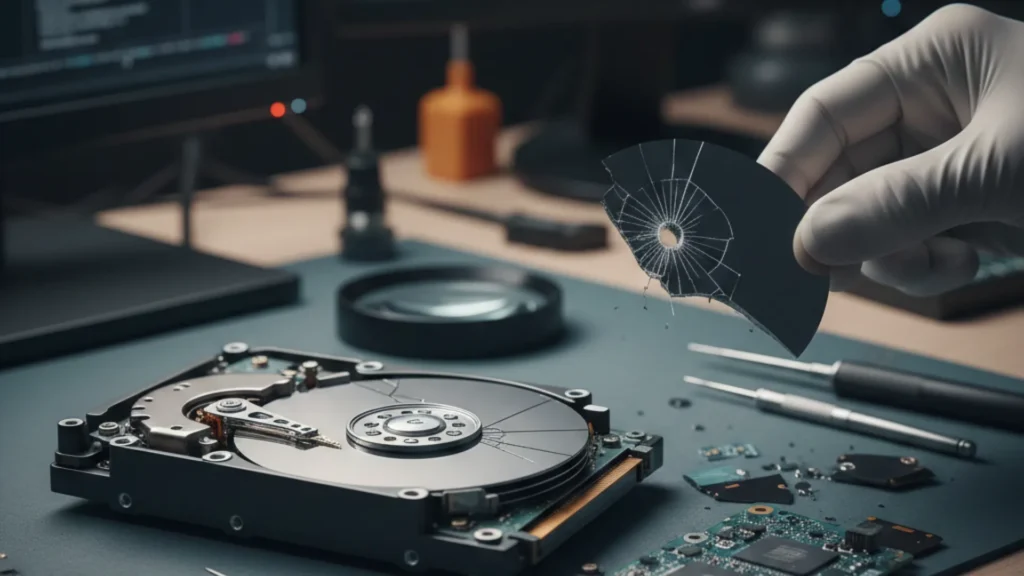
Hard drives are delicate pieces of engineering. Inside that metal casing, tiny read/write heads float nanometers above spinning platters, moving at incredible speeds. When we talk about physical damage, we’re usually referring to a few common scenarios, and this is where professional Data Recovery Solutions become essential.
The Drop Test Nobody Wants
Laptops fall. External drives get knocked off desks. According to discussions on Reddit’s data recovery communities, drops are the most common cause of physical damage people report. The impact can cause the read/write heads to crash into the platters, creating scratches or even knocking components loose.
Water Damage and Corrosion
Coffee spills, floods, or just humid environments can wreak havoc on electronics. Water doesn’t just short-circuit; it starts a corrosion process that can eat away at delicate components over time.
The Clicking Sound of Doom
That repetitive clicking noise? Technicians call it the “click of death.” It usually means the read/write heads are stuck or damaged, repeatedly trying and failing to read data. This is one of the clearer signs of mechanical failure.
Fire and Extreme Heat
Less common but devastating, fire damage or extreme heat can warp the platters themselves or melt internal components.
What the Experts Say About Recovery Chances
Here’s where things get interesting. The recovery industry has evolved significantly over the past decade. Professional data recovery labs now have cleanroom facilities and specialized tools that would seem like science fiction to someone from 20 years ago.
A technician from Adelaide, Australia, explained that success rates vary wildly based on the type and extent of damage. “We’ve seen drives that looked destroyed externally but had intact platters inside. We’ve also seen drives that looked fine but had catastrophic internal damage.
Online communities like the DataHoarder subreddit frequently discuss recovery experiences. One thread from last year detailed a user’s experience with a dropped external drive. Professional recovery was quoted at $800-2000 (prices vary significantly), but the drive was eventually recovered by a specialist who replaced the read/write assembly.
The Cleanroom Factor
One thing that comes up repeatedly in professional recovery discussions is the cleanroom requirement. Hard drive platters are so sensitive that a single dust particle can cause additional damage during the recovery process. Legitimate recovery operations use Class 10 or better cleanroom environments where the air is filtered to contain fewer than 10 particles per cubic foot.
This is why the old “freeze your hard drive” trick or “open it up and look” advice from forums is dangerous. Opening a drive outside a cleanroom environment almost guarantees you’ll make things worse.
What Can Actually Be Recovered?
The reality is nuanced. Physical damage exists on a spectrum:
Minor Physical Damage
If the platters themselves are undamaged, recovery chances are actually pretty good. This includes scenarios where:
- The circuit board is damaged, but the platters are fine
- The motor or spindle has issues, but platters are intact
- External connectors are broken
- There’s minor head damage without platter scratches
In these cases, technicians can often swap components or use specialized equipment to read data directly from the platters.
Moderate Damage
This is where things get tricky. Minor platter scratches might allow partial recovery. The platters are divided into sectors, so damage to one area doesn’t necessarily mean all data is lost. Recovery specialists can often extract data from undamaged sections.
Severe Damage
Deep scratches across multiple platters, warped disks from heat, or corrosion that has eaten through components make recovery difficult or impossible. Even in these cases, some data might be recoverable, but expectations need to be realistic.
The Local Perspective: Adelaide and Data Recovery
For those in Adelaide, having local options for assessment can be helpful. Sam Phone Repair offers initial diagnostics that can help determine whether professional recovery is worth pursuing. The advantage of local assessment is avoiding shipping costs and getting faster answers about what’s actually possible.
The South Australian tech community has grown significantly, with several specialists now offering data recovery services alongside Company Device Repairs. Online reviews and local tech forums suggest that having an initial assessment done locally can save both time and money, even if the drive ultimately needs to be sent to a specialized recovery lab.
Real Stories from the Recovery Trenches
Online forums are full of data recovery stories, both successful and heartbreaking. One story that stands out involved a photographer who dropped an external drive containing a year’s worth of work. The initial quote from a major recovery company was astronomical. A smaller specialist was able to recover about 95% of the files for roughly half the cost by replacing the read/write heads.
Another common story involves water damage. One user on a tech forum described a laptop that survived a coffee spill everywhere except the hard drive bay. The drive was removed immediately and dried, but corrosion had already started. Professional recovery managed to extract about 70% of the data, but the process took weeks and wasn’t cheap.
The DIY Versus Professional Debate
This is where opinions often get heated in online discussions, especially when it comes to Software Repair Services. Some people strongly recommend DIY recovery attempts using different tools and applications. However, here’s the reality: when a device has physical damage, software solutions alone simply aren’t enough.
Professional Software Repair Services go beyond basic troubleshooting. They involve system diagnostics, firmware repairs, corruption fixes, and secure data handling, especially when hardware-related issues are affecting system performance.
When DIY Makes Sense
If the drive powers on and is recognized by the computer, but files are corrupted or deleted, software recovery tools can work. This isn’t really physical damage, though it’s logical damage.
When Professional Help Is Essential
Any clicking, grinding, or complete failure to power on usually indicates physical damage that requires professional intervention. Attempts to power on a physically damaged drive can make things worse by creating additional platter damage.
The Cost Reality
Let’s talk about the elephant in the room: professional data recovery isn’t cheap. Based on discussions across various forums and recovery service websites, costs typically range from a few hundred dollars for simple fixes to several thousand for severe damage requiring extensive cleanroom work.
This creates a difficult calculation. How valuable is the data? For family photos or business-critical information, the cost might be worth it. For replaceable files, it probably isn’t.
Some recovery services offer “no data, no fee” policies, which means assessment is free and payment is only required if they successfully recover data. This model has become more common and reduces the risk for consumers.
The Backup Conversation We Need to Have
Every data recovery discussion eventually arrives here. Prevention is dramatically cheaper than recovery. The 3-2-1 backup rule (three copies of data, on two different media types, with one stored offsite) has been repeated so often it’s become a cliché, but it’s a cliché because it works.
Cloud storage services, external backups, and network-attached storage devices have all become more affordable. The cost of backing up data is now a fraction of what recovery costs when things go wrong.
Common Myths That Need Addressing
Myth 1: Freezing a Hard Drive Can Fix It
This old trick sometimes worked with very specific issues in older drives, but modern drives are different. Freezing can actually cause condensation inside the drive when it warms up, making things worse.
Myth 2: Data Recovery Software Can Fix Physical Damage
Software is great for logical issues (deleted files, corrupted filesystems), but can’t repair broken components or scratched platters.
Myth 3: All Recovery Labs Are the Same
The quality and capability of recovery services vary significantly. Some have cutting-edge cleanrooms and equipment; others are essentially using the same tools you could buy online.
What the Future Holds
Solid-state drives (SSDs) are becoming more common, and they handle physical shock much better than traditional hard drives. However, they have their own recovery challenges. When an SSD fails, it often fails completely and suddenly. The same physical recovery techniques don’t apply.
Recovery technology continues to improve. Labs are developing better methods for reading damaged platters and reconstructing data. Machine learning is even being explored for piecing together fragmented or partially damaged data.
However, encryption is becoming more widespread, which adds another layer of complexity. A physically damaged encrypted drive faces double trouble: physical recovery plus the encryption challenge.
Questions That Remain
Despite advances in recovery technology, some questions don’t have clear answers. At what point does damage make recovery truly impossible? How much data degradation occurs over time in a damaged drive that isn’t immediately addressed? These are areas where even experts acknowledge uncertainty.
The industry also lacks standardization in pricing and transparency of capabilities. It’s difficult for consumers to know what’s reasonable to expect or pay without getting multiple quotes and opinions.
Final Thoughts
Recovery from physically damaged hard drives is possible, but it’s not magic. Success depends on the specific type and extent of damage, the value of the data, and the capabilities of the chosen recovery service. For minor issues, local technicians can often help. For severe damage, specialized labs with cleanroom facilities are necessary.
The most important takeaway is this: if a drive suffers physical damage and the data matters, stop using it immediately. Every attempt to power it on can cause additional damage. Get a professional assessment rather than attempting DIY fixes that might make professional recovery impossible.
As storage technology evolves, these challenges will shift but not disappear. Until we reach a point where data storage is completely immune to physical damage, which seems unlikely anytime soon, the question of recovery will remain relevant. The best approach is still prevention, but when prevention fails, knowing what’s actually possible can help make informed decisions about next steps.
Frequently Asked Questions
Q: Can water-damaged hard drives be recovered?
A: Sometimes, yes. Quick action matters. Remove the drive, don’t attempt to power it on, and get a professional assessment. Corrosion starts fast, so time is critical.
Q: How long does professional data recovery take?
A: Typically 3-10 days depending on damage severity and lab workload. Rush services cost extra but can reduce this to 24-48 hours.
Q: Should an external drive that’s making clicking sounds be turned on?
A: No. That clicking often indicates head damage. Each power-on attempt can create more platter scratches, reducing recovery chances.
Q: Are there affordable alternatives to expensive recovery services in Adelaide?
A: Sam Phone Repair offers initial diagnostics that can help determine if recovery is feasible and what level of service is needed before committing to expensive specialist labs.