

BLOG
Your Samsung phone slipped from your hand and now the screen is cracked, or maybe it stopped responding to touch after a small accident. You search online for a repair shop and suddenly you see two prices for the same screen replacement — one is expensive and called “genuine” or “service pack,” and the other is cheap and called “compatible” or “aftermarket.” You are confused. Which one should you pick? Will the cheap one work fine, or will it create new problems later?
This confusion is very common, and honestly, most people don’t get a clear answer from repair shops because many shops just want to sell whatever part gives them more profit. In this blog, we’ll explain everything in simple words so you can make the right choice for your Samsung phone.
What Does a Genuine Samsung Part Mean?
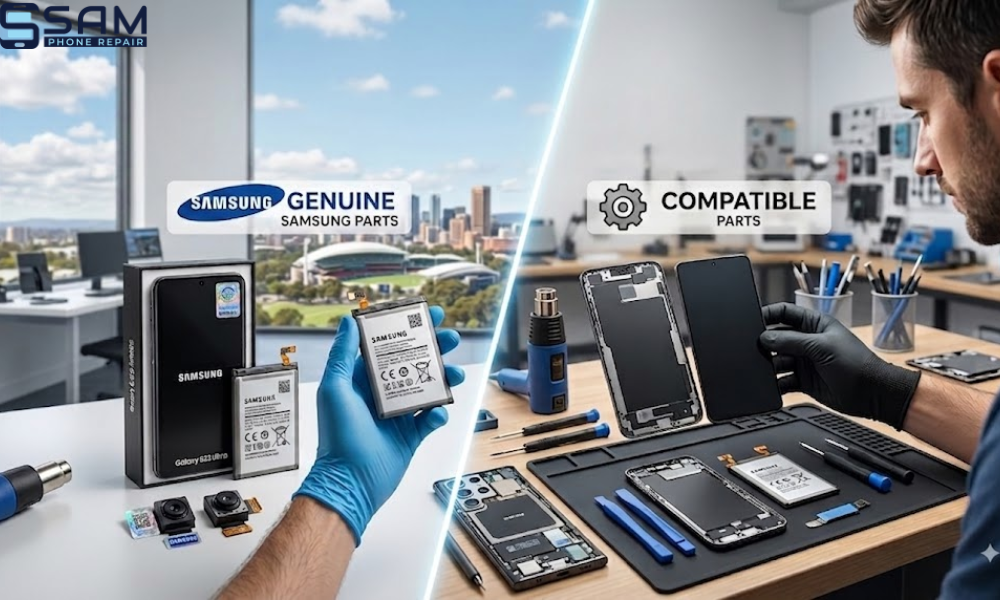
A genuine Samsung part is a part made directly by Samsung or by Samsung’s approved manufacturing partners. This part is designed exactly for your phone model — it matches the original colour, brightness, touch sensitivity, and even the small chips inside that connect to your phone’s fingerprint sensor and other functions.
When it comes to Samsung repairs, technicians often recommend a Samsung service pack display. This is a complete genuine screen assembly supplied by Samsung to authorised repair centres. It usually includes the display with the frame attached and may also come with smaller components pre-installed. Since it meets Samsung’s own quality standards, it’s considered one of the safest and most reliable display replacement options.
What Does Compatible or Aftermarket Part Mean?
A compatible part, also called aftermarket, is made by a third-party company, not by Samsung. These companies study the original Samsung part and try to make something similar that fits the same phone model. Quality can vary a lot here — some aftermarket screens are actually decent and work well for daily use, while others are cheaply made and can cause touch problems, colour issues, or even damage to your phone’s internal parts over time.
Good to know: From the outside, a compatible screen might look exactly like the genuine one. You can’t always tell the difference just by looking at it — this is why trust in your repair technician matters so much.
Genuine Samsung Screen vs Aftermarket: The Real Comparison
| Factor | Genuine Samsung Part | Compatible / Aftermarket Part |
|---|---|---|
| Display Quality | Same AMOLED technology, accurate colours and deep blacks — exactly how Samsung designed it | Similar but slightly different panel; colours can look dull or less bright in sunlight |
| Touch Response | Very accurate, built with the exact sensors Samsung engineered | Can feel slightly delayed or less accurate, especially with fast typing or gaming |
| Fingerprint Sensor / Face Unlock | Sensor calibration matches the phone as designed | Calibration can go wrong, leading to fingerprint sensor issues after repair |
| Durability | Goes through Samsung’s drop-resistance and long-term testing | May crack more easily or develop flickering/dead pixels over time |
| Price | Higher cost | Usually 30–50% cheaper |
| Warranty | Comes with proper warranty and peace of mind | Varies a lot depending on the shop and supplier |
Is a Compatible Samsung Screen Worth It?
Honestly, it depends on your situation. If your phone is an older model, you don’t use fingerprint unlock much, and you just want it working for basic use like calls, messages, and browsing, a good quality compatible screen from a trusted repair shop can be a smart, budget-friendly choice. That said, it’s worth understanding how non-genuine parts can affect phone performance over time, as poor quality components may impact touch response, display quality, battery efficiency, or other features.
But if you use a newer Samsung flagship model, rely heavily on fingerprint security, or care a lot about colour accuracy for photos and videos, genuine Samsung parts are worth the extra cost — it saves you from future headaches and repeat visits to the repair shop.
Tip: Always ask your repair shop directly which type of screen they’re using, and ask them to demonstrate the fingerprint sensor working before you leave the shop.
Why Samsung Phones Sometimes Get Stuck on a Boot Loop After Repair
Another issue people search about a lot is a Samsung phone stuck on a boot loop — meaning it keeps restarting again and again and never fully turns on. This isn’t always related to screen replacement, but it can happen after a repair in a few situations.
Boot loop after repair
↓
Software related — interrupted update or corrupted system file
Hardware related — loose connector or low quality part drawing incorrect power
Network / SIM related — faulty SIM reader or module (less common)
Practical Troubleshooting Steps You Can Try at Home
Before rushing to a repair shop, here are some simple steps you can try if your Samsung phone is having software issues or is stuck on a boot loop.
- Force Restart: Press and hold the volume down button and power button together for about ten to fifteen seconds. This often fixes a temporary software freeze.
- Boot Into Safe Mode: Turn off the phone, then turn it on and hold the volume down button as soon as the Samsung logo appears. This removes third-party apps temporarily and helps you check if an app is causing the crash.
- Check for Overheating: If your phone was very hot before the issue started, let it cool down completely and then try turning it on again.
- Clear Cache Partition: On many Samsung models, you can access recovery mode and clear the cache partition without deleting your personal data. This can fix minor software glitches.
- Check Recent Changes: Think about what happened before the issue started. Did you install a new app? Did the phone fall? Did you recently get a repair done? This helps figure out if it’s a software or hardware problem.
Pro Tip: Before trying any troubleshooting, always back up your important photos and data if your phone still turns on even briefly. This protects your memories and files no matter what happens next.
When Should You See a Professional Repair Technician?
If you’ve tried the basic steps above and your phone is still stuck on a boot loop, not charging properly, or the touch screen isn’t responding correctly after a repair, it’s time to see a professional. Here are clear signs you shouldn’t delay a visit:
- Your phone restarts continuously and never reaches the home screen
- The fingerprint sensor completely stopped working after a screen replacement
- You notice liquid damage or the phone got wet before the issue started
- The screen has visible flickering, lines, or dead spots
- Your phone gets extremely hot even when not in use
Caution: Trying to fix hardware issues yourself without proper tools can sometimes make things worse, especially with sealed modern Samsung phones that need careful handling during disassembly.
A Quick Real-World Example
Many customers come in thinking their phone needs a full motherboard replacement when actually the issue is a poorly installed aftermarket screen pressing on an internal connector. Once the connector is reseated properly and a quality part is installed, the phone works perfectly again. This shows why choosing the right technician and the right part matters just as much as the repair itself.
Frequently Asked Questions
Q: What is the difference between genuine and compatible Samsung parts?
A: Genuine parts are made by Samsung with exact specifications, while compatible parts are made by third-party companies and can vary in quality.
Q: Can a compatible screen affect my fingerprint sensor?
A: Yes, low quality compatible screens can sometimes cause fingerprint sensor problems because the sensor technology may not perfectly match the original.
Q: Is it safe to use an aftermarket Samsung screen?
A: It can be safe if you choose a good quality part installed by an experienced technician, though genuine parts remain the safer long-term choice.
Q: Why is my Samsung phone stuck on a boot loop after repair?
A: This can happen due to software glitches, a loose connector, or a part that isn’t properly compatible with your phone’s hardware.
Q: How do I know if my repair shop is using genuine Samsung parts?
A: Ask them directly and request to see the part packaging, or ask for a demonstration of features like fingerprint unlock before leaving the shop.
Final Thoughts
Choosing between genuine and compatible Samsung parts is really about balancing your budget with your expectations for quality and long-term performance. There’s no single right answer for everyone, but understanding the difference helps you ask the right questions and avoid unpleasant surprises later.
Taking a few minutes to understand these differences today can save you time, money, and frustration in the future — and help your Samsung phone perform the way it was originally designed to.
If you’re based in Adelaide and looking for honest advice about your Samsung phone repair, Sam Phone Repair is known for explaining part options clearly to customers before starting any work, so you always know exactly what’s going into your device.