


BLOG
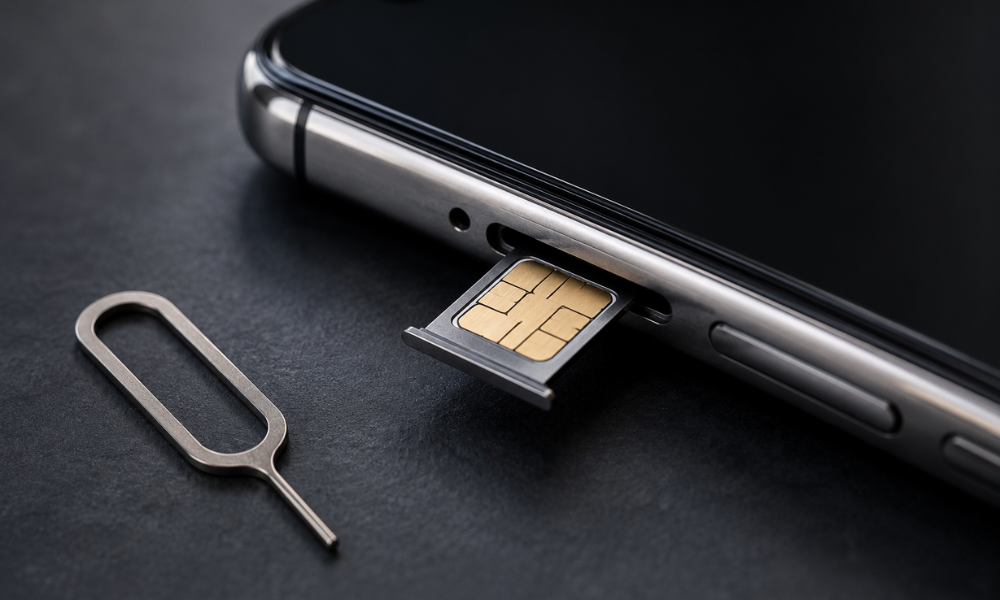
We’ve seen this happen many times. A person walks in holding their iPhone, looking worried and unsure of what went wrong. Most of the time, the story is the same. They were trying to swap their SIM card, but couldn’t find the SIM eject tool, so they used a paperclip instead. While trying to remove the tray, the SIM card slipped out of place and got stuck. Now the tray won’t come out, no matter how carefully they try.
We even helped someone who had this happen just before a flight, leaving them without a working phone number to contact the airline. It happens more often than most people think, and the good news is that in most cases, it’s an easy fix rather than a serious problem.
If your SIM card has gone missing inside your iPhone, or the tray won’t come out and you don’t have an eject pin, this guide walks you through exactly what to do, what to avoid, and when it’s time to visit an iPhone repair shop for professional help.
Quick Answer
If your iPhone SIM is stuck without a tray or eject tool, do not use a paperclip, needle, or pin from a random drawer.
- Try a proper SIM eject tool first.
- If you don’t have one, a flat sewing needle can sometimes work in a pinch, but pushing at the wrong angle can bend the tray or damage the SIM slot mechanism inside.
- If the tray still won’t eject, or if you can feel resistance, stop and get it checked by a repair technician before you cause more damage.
Pro Tip: Before you try anything, power the phone off completely. A stuck tray is a minor annoyance, but forcing a tool in while the phone is on increases the risk of a short or damage to the SIM reader if the pin slips.
Safe DIY Methods Compared
| Method | Safety Level | Best For |
|---|---|---|
| Official SIM eject tool | Safe | Normal SIM changes |
| Straightened paperclip (bent perfectly straight, used gently) | Risky | Emergencies only |
| Flat sewing needle (thin and firm) | Moderate | Light stuck trays |
| Pushpin from a notice board | Not recommended | Avoid entirely |
| Toothpick or wooden stick | Not recommended | Avoid — tips break off inside the slot |
Troubleshooting Flowchart: What To Do First
Step 1: Power off the iPhone completely
↓
Step 2: Check the eject hole for dust or lint
↓
Step 3: Insert eject tool (or straightened paperclip) straight in, push gently
↓
Tray pops out slightly → Pull rest of the way with fingernails, done
No movement, or you feel resistance → Stop, do not force it
↓
Can you hear or feel the SIM rattling loose inside?
↓
Yes or unsure
Stop trying at home — see a technician
Stop trying at home — see a technician
What Causes This Problem
- The eject pin hole gets blocked with pocket lint, dust, or sand, especially if you carry your phone loose in a bag or pocket around Adelaide’s beaches or parks.
- The tray itself gets bent slightly from a drop, even a small one, which throws off the alignment.
- Someone tries to push the SIM in without the tray at all, which happens more than you’d expect when people are in a rush changing networks.
- Sometimes the tray mechanism just wears out over years of use, becoming stiff and harder to release.
Why It Happens More Often on iPhones
iPhones use a very tight, precise tray mechanism compared to some other phones. This keeps dust and water out, which is good for protection, but it also leaves very little room for error. A tiny bit of dust or a slightly bent pinhole can jam the whole tray. Older iPhone models also use a different tray depth than newer ones, so a tool or pin that worked on last year’s phone might not fit in this year’s model.
Step-by-Step Safe Fixes
1. Turn Off the Phone First
Turn off your iPhone completely before attempting anything. This protects the SIM and the phone’s internal components.
2. Check the Eject Hole
Check the eject hole for visible dust or fluff. A soft, dry brush or a toothpick tip (used only to clear dust, not to push the tray) can help here.
3. Insert the Tool Straight
Insert the SIM eject tool, or a straightened paperclip if that’s all you have, straight into the hole. Push firmly but slowly. Do not wiggle or move it from side to side.
Pro Tip: Push once, firmly and steadily. Repeated short jabs are what usually bend the tray or push the pin off-centre — one smooth, straight push works better than several attempts.
4. Pull the Tray Out Gently
If the tray pops out slightly, use your fingernails to pull it the rest of the way. Never use tweezers or pliers to yank it.
5. Know When to Stop
If the SIM has slipped out of the tray and is loose inside the phone, stop here. This needs a technician to open the device safely.
Common Mistakes People Make
- Pushing the pin in at an angle instead of straight
- Using too much force the first time instead of a gentle, steady push
- Trying multiple household objects one after another, which increases the chance of scratching or bending the tray
- Leaving the phone switched on while attempting to fix
- Assuming the tray is just stuck when the SIM has actually come loose inside the housing
Never Try This: Do not use a knife, scissors, or any sharp metal object near the SIM slot. Do not heat the phone to try to loosen the tray, as this can damage the battery. Do not shake or tap the phone hard against a surface. Do not force the tray if it feels like it’s catching on something inside — this usually means the SIM has slipped and needs proper disassembly.
Signs That Professional Repair Is Needed
- The tray won’t move even slightly after a gentle attempt
- You can hear or feel the SIM card rattling loose inside the phone
- The tray comes out bent or damaged
- Your phone shows a “No SIM” message even after reinserting a card correctly
If any of these apply, it’s time to see a technician rather than keep trying at home.
What a Technician Checks During Repair
- Inspects the tray slot under magnification for bends or debris
- Checks whether the SIM card has moved into the internal chassis, which sometimes requires opening the back panel to retrieve it safely
- Tests the SIM reader connector on the logic board, since in rare cases a stuck SIM attempt can damage this part
- Checks for any scratches on the tray rails that might need a full tray replacement
Repair Cost Factors
The cost usually depends on whether the fix is a simple retrieval, a tray replacement, or a repair to the internal SIM reader. A basic stuck SIM removal is generally the cheapest and quickest option. A bent or broken tray costs a bit more since it needs a replacement part. If the SIM reader connector itself has been damaged from earlier DIY attempts, that repair takes longer and costs more, since it often involves board-level work. Getting it looked at early, before more damage happens, almost always keeps the cost lower.
Prevention Tips
- Keep your official SIM eject tool somewhere safe, like inside your phone case pocket if it has one, so it’s always on hand for students, office workers, and anyone travelling around Adelaide who changes SIMs often
- Avoid carrying your phone loose in pockets with sand, coins, or dust nearby
- If you buy a second-hand iPhone, always check that the tray fits snugly and ejects smoothly before finalising the purchase
- If a SIM change ever feels harder than usual, stop and check for blockages rather than forcing it
Frequently Asked Questions
Q: Can a SIM card get permanently stuck inside an iPhone?
A: In most cases, no. A technician can retrieve it safely without damaging the phone.
Q: Is it safe to use a paperclip on an iPhone SIM tray?
A: It’s only safe if the paperclip is perfectly straight and pushed gently, but a proper eject tool is always safer.
Q: Why won’t my iPhone tray come out even with the correct tool?
A: This usually points to dust blockage, a bent tray, or the SIM having slipped inside, which needs a closer look.
Q: Does a stuck SIM tray mean I need a new phone?
A: No. It’s almost always a repairable issue and does not mean the phone needs replacing.
Summary and Conclusion
A stuck SIM tray feels stressful in the moment, especially if you’re rushing to catch a flight, get to work, or stay connected while travelling. But most cases come down to dust, a slight bend, or a SIM that has slipped out of place, all of which are fixable. Try the safe steps first, avoid sharp or forceful tools, and if anything feels stuck or you hear the SIM rattling loose, get it looked at rather than pushing further. A quick check now almost always saves you a bigger repair later.
Stuck SIM tray or a SIM card lost inside your iPhone? Get a safe, professional check from Sam Phone Repair in Adelaide.